Profile

My photo
Just another anime enthusiast.
Showing posts with label technology. Show all posts

Sunday, August 28, 2011

My Memories Suite Review

Some time ago, I was contacted via email by someone to help promote their program. I was then given a review copy of the program to test and write a review on it. The program was called My Memories Suite and it was a digital scrapbook software. I have never used a digital scrapbook before, even a physical scrapbook... I rarely used. So I didn't know what to expect when I first ran the program. But to my surprise it was actually pretty simple to use. Having created something, I was able to make a review. Read on for more.

Firstly, lets start off with the program logo.

Software Logo

Nothing much to say about it except since its version 2, one can assume that future updates will be available to either add content or fix up bugs in the older versions. Thats always a plus. No one wants their software abandoned the moment you buy it. Hence one of the reasons for Apple's success. They treat their customers well and still offer support to them several years after purchasing their devices.

Next to discuss would be the layout of the program. Since I am neither a professional nor an art fanatic, I probably could not full appreciate the magnitude of features that the program offers. However, while I was using it, the program felt like an extension of my own moving limbs.

Screenshot of the program

Why I said that was because everything was clear and just made sense. If you wanted to add a textbox or a photo, go on the right side and pick the right tab you need, and there would be the correctly labelled button which did exactly what you wanted it to do. Completely unlike other softwares (Microsoft Office Word, Microsoft Office Powerpoint), which to insert a picture, you need to go to the top menu then insert then picture. While I understand Microsoft Office isn't a software for creating digital scrapbooks, this program showed that simple and intuitive use of shortcuts makes doing things more like doing things. No more need to scour the menus to find out how to do every little task.

Because I've talked with general consumers, they don't need complicated computer programs. Apple knows this and that is why Apple is so closed, they do everything for you. From forcing you to use itunes with their devices, locking you out of a file system, not letting you jailbreak/unlock your phones. Those sound like all bad things. And in a way they are. But in another way, moving songs from your computer to an iphone if it had a file system could be very complicated. Most likely too complicated for some individuals to do. That means losing sales to Apple, so they just made it easy. What they're doing is targetting the general population (which is the majority). Only computer people would enjoy a file system where they sort their own stuff instead of letting Apple do it for them.

That aside was meant to explain while simple GUI or graphics user interface is important nowadays. If its too complicated for some people, they just won't buy it, if they won't buy it, you won't get money. So the plan is to make it simple enough for even babies to use. Because you can never be too sure.

Anyway.. ! That was a long aside. Great thumbs up for the user interface. Since I couldn't compare with other competing software, I'll leave this point at just that.

Next is the customization. While I may not know alot about art, I do know that art is about expressing yourself. Each person's piece must be independent of each other person and no two pieces of work are ever identical. Therefore, for this program to be truly successful in its own sense requires it to be adaptable to hundreds or millions of different artists and thus ideas.

I believe this company and program can definitely accomplish that. What makes me say that?

Well, there are several reasons. First of all this program offers an extensive list of pre-made templates where you can just apply, then simply add pictures and caption/text. It makes for one professional scrapbook with a few clicks of the mouse and a little bit of typing. Or you can go a little bit more by changing the template around to your free will until you find something you like. The template then bends and wraps around your creativity and that piece of work now becomes art.

Wait... what?? Well, if another person were to use the same template and changed it around, it is highly unlikely it would look like yours. Because you applied your own personality into it, it has individuality and is unique, those are what we call art.

While the program offers templates which are fine and dandy if you just want to get the job done. This program is provides much more than that. There is an option to create your own scrapbook from scratch. You decide what to place where, and build it the way you want. You shape it all in the palms of your hands. No restrictions, nothing. Think of it as using a template then deleting everything on the template. So you're left with blank pieces of paper and the easy to use tools to make everything in your imagination run onto paper.

In both options, there are massive amounts of customizations you can achieve. From changing background colour to creating customizable shapes/text. You can overlap text on top of shapes to give the album some depth. You can even change the kind of size you want your scrapbook to be printed on. You don't have to print on 8.5x11 paper all the time !

There is also a feature to export the album as a set of jpegs, or as a movie. Which also means, you can add sound/narration to your scrapbook. As technology advance, more and more features become available. MyMemories Suite is definitely no exception. Maybe its not new but the idea or adding sounds to a scrapbook seems... unreal.

As for the second reason, this company also offers templates for sale, some of them free, others paid, on top of their already massive library of core templates. These additions will give you more building blocks to work with and increase your arsenal of scrapbook tools. I personally believe this is an awesome idea as alot of other companies had already implemented the idea. In games, these are regarded as DLC or Downloadable Content. If it was on an Apple device, it would be called In-app Purchase. And etc. Either way, this has been very successful to previous companies and are sure to do well for MyMemories also.

Next we'll go through an example of something I made using the program. The scrapbook was about the California trip that I took at the end of June 2011.

I started with one of the templates already there, I liked how it used different boxes put together like a jigsaw puzzle. Since we ourselves also drove around California visiting things we passed by. We did have the 3 cities destinations (San Diego, San Francisco, Los Angeles) but we were pretty clueless as to what to see and where everything was. So whenever we saw something interesting, we parked the car and explored around.

The boxes originally were all separate but I had to put them together so it wouldn't look awkward since I couldn't fit California into a single box. I also changed some of the colours of those boxes. The pictured boxes were already implemented in the template, but it was very easy to add your own.

Here, I added the slanted words on the boxes and added a picture of my own to show how hot it was over there in California. I also changed the paragraphing to fit all the text without overflowing from the bottom.

Nothing special here, that was exactly how the template looked like, I just added the picture.

Also, unchanged from template, you can see how even without doing anything, the page looks great. A balance of pictures with shapes to give the reader some information about the trip without flooding their eyes with photos after photos.

Again, unchanged from template. I should mention that when you add the photos, because these photo boxes are square, parts of the photo is cropped (you can have it stretched if you wanted to, but I like cropping). Simply double click the picture and it'll open up a window which lets you control what is cropped, where is the center of the picture, etc. Very easy to use. Great for old people who are not into computers. And young people who want to share their experiences with friends but not familiar with artist terms like balance.

Picture of the Hollywood Walk in the evening. Shifted the focus down, perhaps a little bit more exposure of the sky would be better (?).

Nothing to add here.

This was probably the most interesting page I worked on, along with the one below. This specific page in the template (you can remove the kind of pages from the template you don't like and add duplicates of others as you see fit) had no place for words, so I decided to put something that didn't need many words on this and the following page. Something that tells itself. Something like an amusement park. And the 8 squares just perfectly fitted Lego Land. Great !

This page, I started with the same template as the previous, but I rearranged everything since Sea was only 3 boxes and World was 5. I added a little bit of overlap to create depth and tilted the words so they were parallel with the boxes.

Nothing in particular to add either.

This template had a good amount of pages without text areas, which was fitting for my trip as we mainly were sightseeing and exploring what attractions were available in California. Also, I dislike writing. Hahaha...

Again, I rearranged some boxes so I could have 3 coloured boxes adjacent to each other to spell out "See" and "You". As I mentioned previously, even though you loaded a template, each item (shape, text box, etc) are completely moveable and removable so you can make it fit your taste. No longer are you confined to the restrictions of the program. MyMemories Suite is made to fit you.

Video Tutorial (Provided by the company):


Welcome to the Family! from Lisa Jurrens on Vimeo.


Lastly, I have 2 things to share with the readers. Firstly, I was given the opportunity to host a giveaway of the program to one lucky reader of my blog.

Entry is simple. Just surf over to MyMemories' website and share your favourite kit (template) in the comments below. Just simply state the name of the template with the URL and why you like it (please write more than one sentence).

For example,

Fireworks Vol 1.
http://www.mymemories.com/store/display_product_page?id=MRKZ-EP-1105-2036
I like it because I enjoy looking at fireworks explode in the sky, they are so beautiful and mesmerizing. I want my scrapbook to have an impact and capture the attention of its viewers.


I will pick one of the comment randomly (I will random generate a number between 1 to #comments, the comment number that shows up will be the winner) on October 31, 2011. That is just about 1 month of time. Hopefully there will be a good number of applicants so it can be a little bit more lively here. (Even if its just once)

__

The second thing is for those of you who either don't want to wait until October 31, 2011 or didn't win in the giveaway. I was given a $10 off promo code to supply to the readers of my blog (Hurray!). So I'll share it with you all, if you wanted to get that scrapbooking software, now is the time !

The code is below,
STMMMS2796

Conditions (Taken from the site):
  1. This unique code is ONLY good for My Memories Suite v2
  2. MyMemories reserves the right to modify terms or conditions

Thank you for reading and best of luck in the giveaway ! If anyone wants to leave any comments or questions, please do so in the comments section below. I will try my best to answer them.


Read more!

Thursday, May 26, 2011

Blackberry Playbook Review

Today I have something to share with you all. A close friend of mine recently won a Blackberry Playbook from an event and I had the privilege to test the machine over the course of a few days instead of at a store such as BestBuy. Read on if you're interesting to hearing what how it worked out for me. The price is $499.99.

*Warning, walls of text to follow*

My testing was just based on the casual usage of the system using relevant features that were available to me. I will not be comparing to the iPad2 or other tablets as they are different systems as a whole. But by simply stating what was done well and what was not.


Home screen, applications on the bottom, the middle is the programs that are opened.

Firstly we'll talk about user interface and first impressions of the machine. What the system feels like when you first turn it on and the first few minutes action. Its good. For real. While some may think that Blackberries without a physical keyboard would be a disaster (ie storm). But with this size of a tablet, physical keyboard would destroy its thinness or the large screen size. The typing is very easy with just the thumbs anyway (atleast for me). The UI seemed intuitive, swiping the fingers from the left and right switches applications, swiping from the bottom bring you to the home page. And swiping from the top opens up the options of the current app. I have been an Apple user for a long time now, about 2 years. So this Blackberry device was my first ever. I picked it up and was using it like a pro within minutes. That’s how easy to use it was.

The size is nice and portable. With both hands holding the tablet sideways, one could easily reach half of the screen with each thumb for total accessibility of the entire screen. The tablet feels somewhat heavy and feels solid. As one should expect when purchasing something in the hundreds of dollars range. Its small size will fit basically all bags. The device came with an official Blackberry sleeve. It was made of those elastic material so the fit was perfect. Too perfect for me, so I didn’t like it nor used it because of the hassle to put it in and take it out. It fits into those pockets in the front of hoodies. When I needed to put it away quickly, I just stuffed it in there. Good stuff.

Blackberry Playbook and Cover sitting on my lap.

I didn’t try the HDMI out. As we didn’t have any of those cables at my home. The microUSB slot also caused tons of problems for us as we didn’t have those either. Luckily my brother’s android phone charged with a microUSB cable so I borrowed it to transfer files over from my computer to test on the Playbook. As well as transferring out some pictures from the Playbook to the computer to upload for this post. The screen on the Playbook was great, videos and photos were very clear and crisp. However the Playbook lacked a lot of codec for videos. I may not be a pro but only .avi files were detected from the .mkv, .avi, and .rm files. That was a little disappointing as all my anime videos are in .mkv format. When connected to the computer the Playbook acts like a portable hard drive with pre-created folders and files for the device to function. Creating folders with Chinese or Japanese characters did not cause problems for the device to locate files.

For what you pay surf the web or do documents or play some light games, this blackberry is fun to have. Its small, quick, and easy to use. It feels more rigid than most laptops. Considering this has no keyboard or hinges for folding, the increased toughness makes sense. On top of all this, the blackberry play book is sleek.

However at the time of this writing, that was the limit of goodness this machine had to offer. On the down side of intuitive controls and smooth operations, it lacked a large choice of software compatibilities. And while everyone has been saying this already, as a comparison with the Apple ipad. Yes, the ipad has a ton more apps. But the question is, do people need all those apps?

So since I am a typical user, I will assume that the apps I wanted were of a typical user. So lets get on to what the Playbook did have and not.

Firstly, we'll need to go over the purpose of the tablet so we can filter out the necessary from the desirables.

For a tablet to have a purpose, it needs to do certain things better than a laptop and a smartphone so it is viable to carry an extra device.

Ok. So what do we not like about the smartphone? The small screen. And the laptop? Slow boot up time, poor battery life, etc.

Keep in mind that I am not a Blackberry user and therefore, I did not have any access to Blackberry Bridge.

For me, when I am outside and need a computer, I do some of these things;
- Surf the web
- Check emails
- Watch videos
- Check maps/addresses
- Write notes
- Play games
- Take photos of interesting things
- Blogging

So lets go over each of these things.

Surfing the Web
The browser works great, user interface adds even more to the overall experience. The browser also has the option to turn Adobe flash on and off. For those who require it. However I found that flash generally caused the browser to slow down.

On the other hand, I was not once able to get the Playbook to connect to the web through tethering to my iPhone 3GS. This is probably the deal breaker for me to even consider the Playbook. I tried Bluetooth and wifi (through cydia app) but neither worked. My brother tried tethering with his iPhone 4 and while it worked, the connection was extremely slow. To the point that it could be called “not working”.

The Playbook would be amazing for surfing the web on public wifi at coffee shops or restaurants, except it never worked for me.

Checking Emails
BAD. In order to check your email, you have to open a browser then go to the corresponding email provider webpage (gmail, hotmail, yahoo mail, etc). There was no program for the email service (again, not sure about Blackberry Bridge). You have to sign in again and again since it doesn’t remember passwords. Basically a lot of hassle. I checked the app store but couldn’t find a email fetching app. So currently, its extremely tedious to check simple email. Kind of like a laptop.

Watching Videos
Youtube works well, like you would expect. Video quality is clear with the brilliant screen. This could totally replace the laptop in this department. The bigger screen size than phone also makes it much more comfortable to watch a movie (imported from computer). Definitely a plus.

Checking Maps/Addresses
Not that great on the tablet as 1, unable to to my iPhone so I couldn’t use it unless wifi was nearby and 2, the map database was bing and not google. The con about bing is that their maps aren’t as complete as google (some smaller roads inside campuses or malls aren’t shown). Aside from that the map program runs as expected, same with locating addresses so you don’t get lost. I use this feature mainly on my phone when traveling somewhere to make sure that I was going in the right direction.

Writing Notes
There is the Document to Go app on the Blackberry Playbook. Which is good. However, no exporting by upload or email. Which is bad. It has all the font, paragraph, etc options. Which is good. However I’m just writing a note, not an essay, which makes it pretty meaningless for me. Which is bad. The load time is fast. Which is good. But can’t export out of the device except by USB to computer. Which is bad. It goes down to, lack of exporting options which is the weakest point for this usage. Aside from that, more functionality for its word processor is a good thing.

Playing Games
The current game library is lacking in both quality and quantity. Even the “best” game, the Need for Speed game which came with the release of the Playbook was pretty choppy. The game felt “laggy” and not refined. The Playbook processor should be far superior, I blame the game and not the device as even though the game is laggy, when you swipe up to go back to the home page, it is extremely smooth. This was seen in other games I tried playing. Looking through the game section, games were either not interesting or poorly coded. Bottom line is more developers need to start/better code for this system before it could be capable of playing games.

Taking Photos
Brilliant. Nothing much to say here. Camera works like a camera. No focusing on a point though, atleast I couldn’t make it work. Also, taking picture process seems funny but turns out ok. When you take a picture and move, the picture looks blurry on the screen, but then when you go to the picture app and look at the picture, its perfectly clear. Its just weird, but doesn’t affect performance. I wouldn’t pay too much attention to it though, afterall, it does a good job taking photos. But the device is much bigger than a phone.. so whether that feature is any use, will depend on various people.

Blogging
No blogging program at time of writing.

Final Decision
For me, I would not even consider getting this tablet based on what is available right now. The reason is because I cannot get online with the device through tethering with my iPhone 3GS. It also lacks games and an email fetching service which I have on my iPhone. Lastly, my eyes work well enough not to require a bigger screen to read emails and text on a screen. At this point in time, less weight on my back to prolong back pain is more important than bigger screen to prolong my eyesight… Or something like that…

While the Blackberry Playbook does have many great features, I currently do not see its existence for a normal consumer not running on a Blackberry phone. If you do use a Blackberry and use the Bridge software, write in the comments below if it works well for you.

Read more!

Tuesday, August 31, 2010

Interesting Video: Kyoto Subway


The video above is the Tozai Line in Kyoto. Its regularly looking and sounding right?
Well, look what the inhabitants of Nico nico douga did. Results below.


I must say, I'm impressed, not just the creator/creation, but Japan as a whole. This isn't the first "remix" of anything done by nico nico douga. In fact they've done a whole lot. Here are some examples.


Most of their work involved replaying some lines over and over again with a specific background music. Accidentally it becomes quite addicting.

They even have a theme song. Its basically a whole bunch of songs linked together from many series (and games, ie Touhou). Oh its over 10 minutes long.


Read more!

Monday, August 9, 2010

[Wacom] Bamboo Touch & Pen Tablet Review

I bought this on July 27, 2010 at CanadaComputers when there was a $5 discount, at $90. There were a few reasons for the purchase. Even though I can speak for myself that they weren't well justified. But since I bought it, I might as well give a review on the product. So future consumers will have an additional option for checking product reviews.

The main reason for me was because this version does not require batteries at all. AT ALL!
No more dying in the middle of a stage on osu because battery was low. I couldn't be happier. Also, the multitouch idea was great, since my parents aren't good at a mouse. Eventually, I'll be giving this to them when I either buy a new one or stop using them all together. So its better to plan ahead. I've never really used multitouch on a window 7 computer before, so I was kind of excited.

I will mention first that these photos were done on my iphone 3GS, in very bad lighting conditions (I tried my best with a ceiling light and desk lamp). The phone just has incredible amount of noise! Unforgivable !

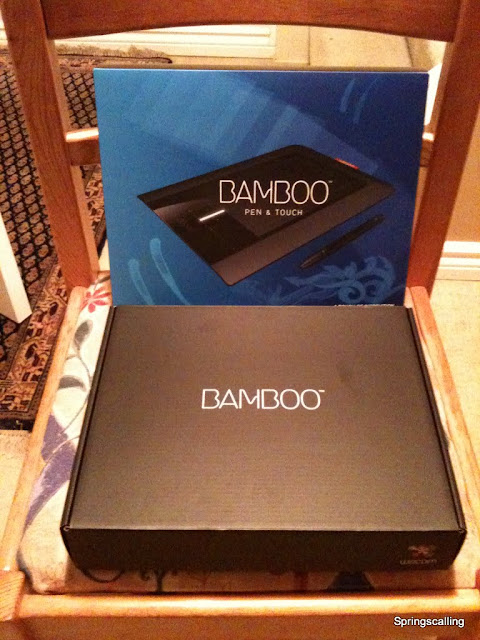
Lets start with the box. Its very nice, as you would expect from a product of such a price tag.


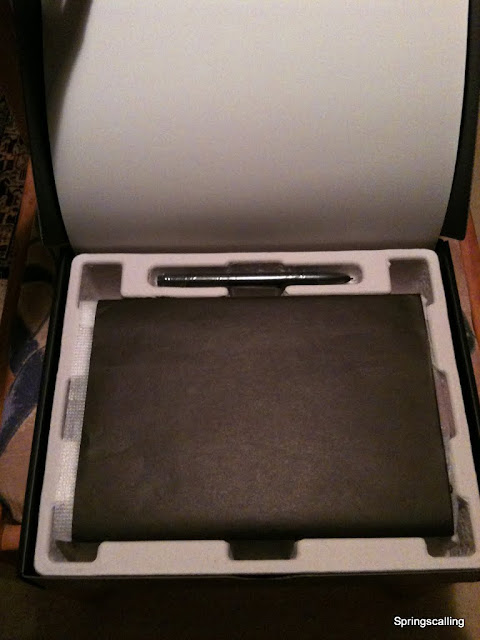
The box came with a bunch of stuff.
- Tablet (USB cable attached)
- Stylus
- Installation CD
- Software package CD
- Replacement pen-tips

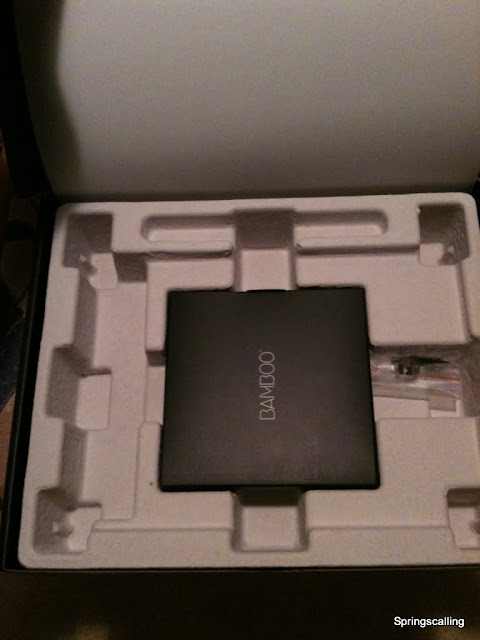
There were alot of packaging on each of the item. Paper wrap around the tablet, plastic wrap for the stylus, ziplock bag for replacement pen-tips, cardboard CD case for the CDs. Good thing I wasn't charged based on weight. Alot of dead weight in the box. Haha.

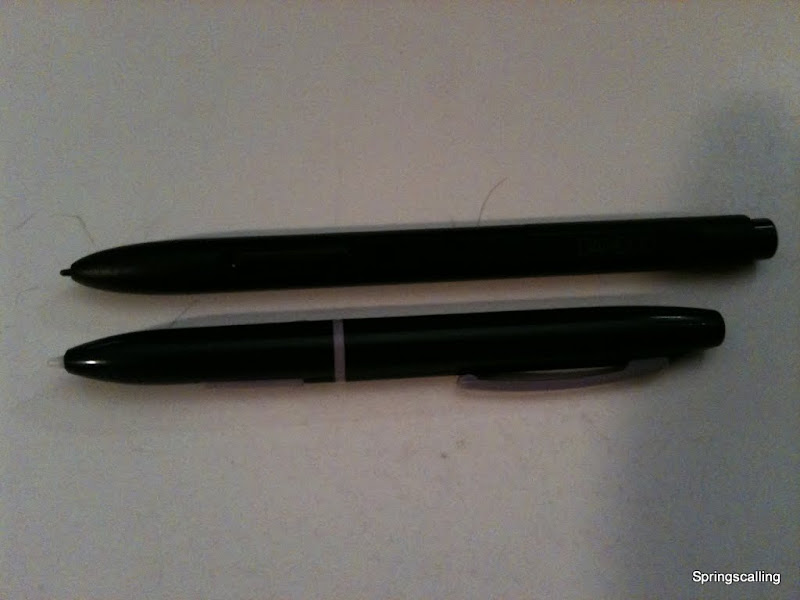
Now lets get onto the actual product. And what it looks like. The pen feels good and solid, nothing seems loose other than the pen tip and the eraser which are both loose so you can apply pressure without damaging anything. I would have liked it a bit more if the stylus was thicker, it would make it easier to hold onto. Also, I found it rather easy to press the buttons. Perhaps I'm just gripping too hard though. I often press the buttons when I play osu, which is bad.

New Wacom stylus on top, Old Genius stylus on bottom

The eraser tip works fine after installing the driver, needless to say, before that, nothing works, only your fingers are registered on the tablet (not stylus, not multitouch). I would have to say something I don't like about the stylus though. The pen-tips are relatively easy to use up. What I mean is, every time you use the pen, parts of the tip is "eaten". Until the length is no longer there and they give you replacements. Thank god they do give you some extras. Or perhaps, Im just a heavy user (with osu and all).

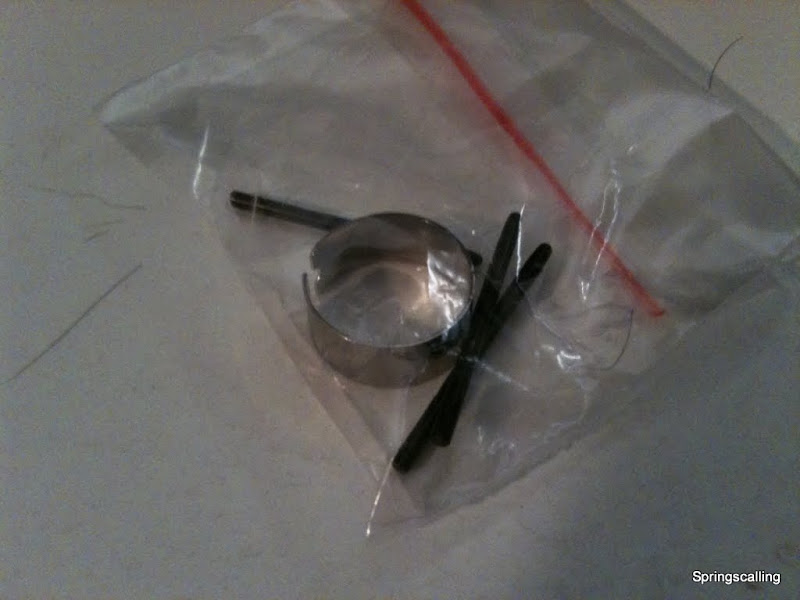
Replacement pen-tips (3x) and tool for taking out pen-tips (1x)

After installing the driver, you can setup your pen with the feel of the tip/eraser (ie how hard you need to press), the double clicking speed, the boundaries, the buttons, and some other options. Likewise, you can also calibrate your sensitivity for the finger control on the tablet, as well as which gestures (2 finger scrolling, dragging, etc) you can enable and disable. You can also set up the 4 buttons on the tablet for pretty much anything.

The tablet is somewhat more resistive than the genius one I had. Be it good or bad. Its generally more resistive than your standard laptop ones. About the same as those HP ones with the glossy finish. I'm used to using the touchpads on the Asus laptops and theirs were pretty smooth. This was definitely more resistive than that. The tablet generally work well, but takes time to get accustomed to. The 4 buttons are useful but I hardly use them. The multitouch gestures are all that I use, of course, I still need my keyboard (nothing is currently there to replace that, as typing is a must).

One special feature of the tablet is the light on the left (or can be right depending on whether you are left handed or right handed, you can set that up in the tablet options). Its off when its not plugged in (duh). White when its not in use but powered. Bright white when your finger is touching it (ie. touch recognition). Red when stylus is in close proximity or touching the tablet. It has a smart system where when the style is within range, all finger input becomes ignored. The idea is so you can rest your hand on the tablet when you draw. But I personally like to be able to use my left hand to navigate the painting canvas while my right hand draws. If I want to do that, I have to first remove my right hand, navigate, then put the pen back onto the tablet. Oh well, maybe next time.

This new tablet is smaller than my previous but I've gotten used to it now when I play osu. I didn't use the old tablet for anything other than photoshop work and osu, but atleast this new one, I use it to surf the web too.

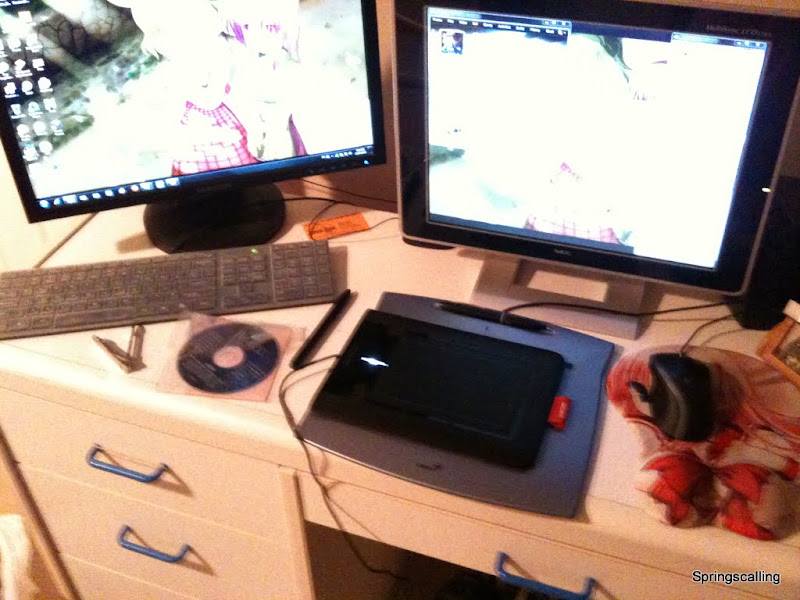
Tablet size comparison, along with my current desk setup

The gestures on the tablet basically all work on window computer, with exception to the rotate on window picture viewer but thats not too much of a problem for me. Since I use the keyboard solely when I browse photos. The zooming and scrolling also isn't smooth as I would have liked. Although I don't like Apple, I must say that their touch pads are spectacular. Or it might be their OS. This tablet works on a mac too, but I just haven't tried it myself to give you an opinion. The scrolling feels the same with a mouse scrolling, it goes in chunks, not like the mac where its smooth. I assume this is an OS problem though.

Last topic, usage intergration.

I call it that because at the end of the day, what separates this (with the price tag and features) is ultimately the multitouch. You can easily find a Genius or even another company that features a tablet without multitouch for a fraction of the cost. Heck, even Wacom has a just pen version or just multitouch version.

So the question here is, was multitouch really worth it?

I will give you my honest opinion.

No, it wasn't. Why?

Its simple. For people like me, who has grown up in this world using a mouse since grade 3, I've completely familiarized myself with a mouse. There is nothing (almost nothing, I'll go over the things later) I can do with a tablet faster than with a mouse. One can complain my mouse isn't a crappy mouse, yes, thats true, but most mouse have the same features mine does.

So lets compare what you can do on a mouse vs tablet in a few of the most normal things you do on the computer.

Web browsing:
Neither really have any advantage in this area, except I am more precise with the mouse than I am at the multitouch interface. One may however argue, but 2 finger scrolling !

Yes, but my mouse has a wheel, which is pretty quick and easy to use. But you may then say, you can zoom in/out with pinching!

Yes, but zooming is done by holding control on keyboard then using the wheel. One may then ask, but 2 finger side scrolling goes back and forth pages!

Yes, but theres a button on my mouse for forward and one for backward.

Typing:
Keyboard is the main thing here, but in the cases of scrolling down to find something in the document, again, I find myself more efficient on the mouse than on the multitouch tablet.

Gaming:
I think its safe to say that no one games on a tablet, should it have multitouch or not.

Photoshopping:
I can see a good use of multitouch in this aspect, especially the panning left and right and up and down with 2 fingers scrolling in photoshop. Unless there are shortcuts which I'm not familiar with, I always have to use the navigator tab to pan around my image when I'm in photoshop. So the multitouch tablet definitely takes this round. Also, its near impossible to draw with a mouse.

As you can see, for people who are already proficient in the mouse, multitouch tablet isn't going to be much use. Even after you practice. But Steve Jobs (Apple CEO) might be pushing towards that kind of computing. So its not too bad of an idea to pick up one if you decide the price is just right. However, it does not replace your mouse anytime soon.

If you're a new computer user, by all means, you might as well pick one up. The reasons are simple. Mouse is only for desktops, and maybe laptops if you don't mind carrying an extra mice with you, but most people will have a laptop in their life at some point. So its not a bad idea to start familiarizing yourself with multitouch and the touch pad which is on almost all laptops (minus some Lenovo ones).

If you're into art, you're going to have a tablet for sure, so might as well make it a multitouch tablet, since you're the kind of people who likes to touch things anyway. Though I realize the expensive Wacom tablets don't offer multitouch.


Even though I said that it wasn't worth buying the tablet, I don't regret it. I've never really bought much for myself. I wanted to try something new. And now I have, so I'm happy. I'll continue to use it. Since its nice to surf with your fingers instead with a mouse from time to time. Makes you feel more in control.

Please be advised that although this is a review, this is still filled with alot of opinions. So if you do not feel convinced to buy, Engadget does provide a video review for your satisfaction.

Gallery: Here.

Read more!

Monday, May 17, 2010

Mind Blowing Light Art


I came across this at Gizmodo so I thought I would post it.

Truly amazing work in my opinion. I have no idea how it works. I am guessing there are a bunch of lights on tracks which can move and rotate to give different perspective lighting.

Link: Here [Gizmodo]

Read more!

Friday, May 14, 2010

Happy Day, May 13, 2010


This post won't be posted on May 13th, 2010. But it was written for that day to announce to the world 2 events worth celebrating.

The first is, I passed my G Driving Examination! This means I am fully capable to be on the road with a car (Atleast thats on paper, I am allowed to). I did take the test at an easier course, there was no need for lane changes on the highway. Also, the highway was 80km/h instead of the standard 100km/h. It wasn't a 400 series highway.

But nevertheless, its over! All the delaying is finally put behind me. I don't have to worry about driving liscence ever again. Only need to renew every few years. But no need to start again from G1 ! Which I would have had to if I had let it expire July of this year.

The reason why I am not posting this until probably 2 weeks later or so is because my parents kept pestering me about the driving test. So out of spite (and because I'm a terrible boy) I decided to deceive them and saying I didn't have an exam and it was all just a scam (a mean one at that, as they've kept pushing and bothering me to get my G liscence done). Do you ever feel like you want some privacy and some space but no one gives it to you? I don't know why, I get it alot around my family. But lets not talk about the sad stuff. I can give you all the gory details if you so insist. But let that be for another day.

With that said, that was the first good news.

The second was I got my iphone replaced. I noticed a crack at the dock connector. People told me about Apple's "great" customer support. So I looked up my case, and I found out other articles online mentioning that Apple would replace the phone for such cracks. So with that in mind, I booked an appointment at 3:50pm of May 13, since I had already taken the day off due to driving examinations.

I got there a bit early, like 1:30, so I asked if I could move my appointment forward, since there was a free spot at 1:40, I was bumped to that time and my 3:50 appointment cancelled.

So the Apple genius greets me, I greet him. I told him about the crack. He said that the crack was so small, normally they wouldn't do anything but they'll make me a special case and replace my phone anyway. So I said "Ok" since that was expected. (Though I don't believe the "I'm a special case" thing since large or small crack, a crack will only get bigger, so he might as well replace it now, since my warranty still has about 2 months to go).

So he took a "new" (from what I can tell, its a refurbished phone, serial starts with 5K, and the box is a white box instead of the genuine iphone box) iphone 3GS, put in my sim card, then have me sign a sheet of paper saying that a replacement iphone was removed from their inventory. And I was left on my way.

Service was quite fast, I never looked at what he was doing with his genius iPod touch. (Maybe database information, ie how many refurbished iPhone 3GS are in stock?) Well, it is regrettable that the phone wasn't brand new, but as long as I don't get any problems and the case doesn't crack again, thats all that matters to me. Probably less than 15 minutes to complete the whole process.

With that said, if anything were to happen, let it occur before the 90 days from May 13th. So I can get another free replacement without applying for additional warranty (which I have no plans to).

On a plus note, my warranty was extended by about a month!

This encounter with Apple was definitely positive. However, I would not yet feel ready to give them my life (computer). I am still very much going to stay with a windows computer unless something major happens.

Read more!

Saturday, May 8, 2010

Window 7 Anime Commercial & UW Secret!


This is pretty good. Lol! Source: SankakuComplex (NSFW)
I am proud to be a Window 7 owner now. Genuine.. of course! ;)

UW Secret after the jump!

For those who goes to the University of Waterloo (UW), just so you're not missing out, you are entitled to a free copy of Window 7 Professional!

Please check out here. Then once you're ready, you can go to here to sign in and download!

I've had known this place from my friend Tim. Many thanks to you!

If you're a University of Waterloo student and do not require the free liscence keys for the OSes available to download, feel free to send them over here! :D

you can reach me at tomabackspin@gmail.com, or msn pakhinlaw@hotmail.com

Happy downloading!


Read more!

Tuesday, March 30, 2010

Editted on Computer: Computer setup changed


Not a big deal, I know. I just replaced my wireless mouse and keyboard combo for an individual mouse and keyboard. Mouse is by logitech (naturally) and keyboard is by elephant
Because of the lesser clutter, my tablet can also happily sit on the desk. :D
Not that I use it much for anything, currently just to play osu!

Added comments: As you can see, there are many things that the iphone app, BlogPressLite, can not do. Ie. Hyperlinking text, or problems with the size of image uploads. FYI, the banner, despite being so small, was directly uploaded from my computer to my iphone. Thus resolution would have been the same. It was just due to the app which had resized the image to being unseeably small (if theres such a word as unseeably, haha).

It is much more practical to do a quick post on my iphone then edit it afterwards on computer.

Also, because its a pain to type large amounts of text, I will just include my comments on the previous keyboard and mouse vs the new ones I have here.

First of all, I would like to express my dissatisfaction with wireless technology. Althouhg wires do get in the way every now and then. After years of using wireless mouses which require recharging.. say every 5 days. I think thats more of a hassle than reorganizing the wires so they don't obstruct. Sometimes even at close distances, the transmission is interferred, and gameplay is affected. Terrible. Of course this might not count for all wireless mouses on the market, the one I had, however, was easily interferred. Especially when the desk is not very big and you own too many gadgets, things starts getting in the way of another.

Secondly, I love this new keyboard, its flat, I like how it looks. I also like this notebook style keyboard because the keys are easier to press (in my opinion). They are also protected by a silicon cover. Its much like the apple one, except its entirely plastic (the outside) and theres no additional usb slots. I don't have anything against my old keyboard, though because it was OLD, there was no driver for window 7 or even vista. Therefore I had no multimedia features for the past 3-4 years or so. This new keyboard doesn't have multimedia buttons either. I guess thats not a problem anymore...

Lastly, this new mouse is ok. Not terrible good nor terribly bad. It seems more sensitive than my previous mouse under the same settings (perhaps this meant the transmission through wireless wasn't 100%). But thats not a problem, the difference was slight and it was easily compensated for. What bothered me more was the wheel that microsoft was so proud of implementing. I'm not going to say it doesn't work, because I think they knew about it. The problem was, the wheel is not very precise, if you want to scroll a little bit, then it either doesn't register that you're scrolling at all, or it scrolls too much. BUT the button right below the wheel, turns on and off the "endless scrolling". So I guess if you don't want to skip through an article and look only at pictures, then you wouldn't turn on that scrolling feature. The reason why I don't like it is because I prefer to not need to change between modes. So at this time, I am using the normal scrolling option.

Prices: Keyboard was $22.99 at CanadaComputers. Mouse was $34.99 at FutureShop. I think its acceptable for the quality of the purchases.

If you got any comments, just post below. Thanks.

Read more!

Computer setup changed


Not a big deal, I know. I just replaced my wireless mouse and keyboard combo for an individual mouse and keyboard. Mouse is by logitech (naturally) and keyboard is by elephant


Because of the lesser clutter, my tablet can also happily sit on the desk. :D
Not that I use it much for anything, currently just to play osu!

- Written on the go from iPhone 3GS

Read more!

Sunday, May 10, 2009

Blog Creation


I didn't actually think I would create a blog of my own. My life isn't exactly as fun-filled as most of your lives, I don't think. I will post some information about myself in the profile section as time permits. Whoever that wishes to view this blog. I give you my sincere thanks for reading whatever stories I have to tell.

Before I start anything though, I would like to hear from people what I should be posting (or what you might like to see) in this blog, other than just my life.

I will also need to learn how to do many things about blogging, such as how to upload pictures (ie, photobucket, flickr, etc), videos (youtube, etc).

I will be very inexperienced for this beginning month or so, so please be patient and forgive any mistakes I may make which could possibly offend you (the viewers, as you are the important people ;D )
I am generally a happy guy, I do hope that over time, that feeling does not change with me.

So lets see...
For the first post, I'll post about something that I am/have been interested in for a long time.

Japan!

Mainly in their anime and electronic sectors.
Big fan of animes and technical innovations.

Since I live in Canada, I have already bought AnimeNorth 2009 tickets which is on May 22-24, 09. I hope to see alot of things happen there as I went last year. Very fun times. I'll most likely post images from AnimeNorth 2008, AnimeExpo 2008, and AnimeNorth 2009 when I get around to it.

I watch many anime series also, unfortunate, I do not have a method to share what I have watched with you all.

The typical genres I like to indulge myself into includes Comedy, Romance and Drama. Although I have watched gundam anime (even Zeta, hahaha.. =x). I do not really enjoy them because I feel slightly unhappy to watch the same things happen again and again.

Example: Good guys meet bad guys, good guys losing, good guys gets power ups, good guys winning, bad guys losing, bad guys comes back, bad guys gets power ups, good guys losing, *loops*, *near end of series*, good guys power ups some more, bad guys dies (finally).

That just doesn't appeal to me anymore. haha.. I'm sorry.


As for the technology of Japan which I like, they use robots far more than we do in Canada. ie, in the automobile industry. I would love to visit japan to see how far ahead they are in tech. Those walking legs invented by Honda might be useful, I can't seem to walk far distances before my feet starts hurting. For your information, I am already wearing orthotics.

Link: http://gizmodo.com/5212161/how-it-feels-to-walk-with-hondas-cyborg-legs

I guess I'll rap up the first post with a few interesting links I found online and a few practice photo and video uploads. Also, I should mention, its MOTHERS DAY in Canada, May 10. Go hug your mom and tell her how grateful you are for being born, etc, etc. It only happens once a year, so cherish it !

http://kotaku.com/5247049/sf-flowchart-all-roads-lead-to-shoryuken
Love that flowchart. I don't play street fighter. But I'm sure I'll get rocked real hard if I did =x. No, I'm serious.

http://kotaku.com/5242698/new-beta-opt+in-process-for-starcraft-ii
Starcraft II beta sign up. You might have already done it but if you didn't, enjoy ;)


Images: I might mention the first picture at a later date. Its a work I did a few weeks ago to put as my wallpaper. I am terrible at drawing so I didn't draw anything. Basically, I only did a few edits on it. I'll post more on it later though (including the source of the image, so please don't kill me D: ).
PatchCON, a Touhou game, I found it interesting that Cirno's (character in game) face was made.

Video of me playing piano, song is Kotoko - Allegretto.


Pictures for my mother.


And a poem to go with ;)


Today I say "Thank you mom",
The love you gave has made me numb.
Forever I will cherish those memories,
So here are some roses and lillies.
Please accept my humble gift,
and look after me until twenty-twenty-fifth (2025).

Its so hard to rhyme >_< !!

My english received 68... laugh if you want, but I can still write a poem !

Have a good day, enjoy it to the fullest !

Read more!